5 Free Tools Students Should Use for Academic Work
Managing academic work can be challenging when students need to understand difficult concepts, complete assignments, prepare for exams, and organize their study schedules. With multiple subjects and deadlines to handle, finding the right learning resources can make everyday studying more manageable.
Fortunately, several free educational tools and apps help students improve their understanding, practice important skills, and complete academic tasks more efficiently. From learning platforms and writing assistants to plagiarism checkers and English learning resources, each serves a different purpose.
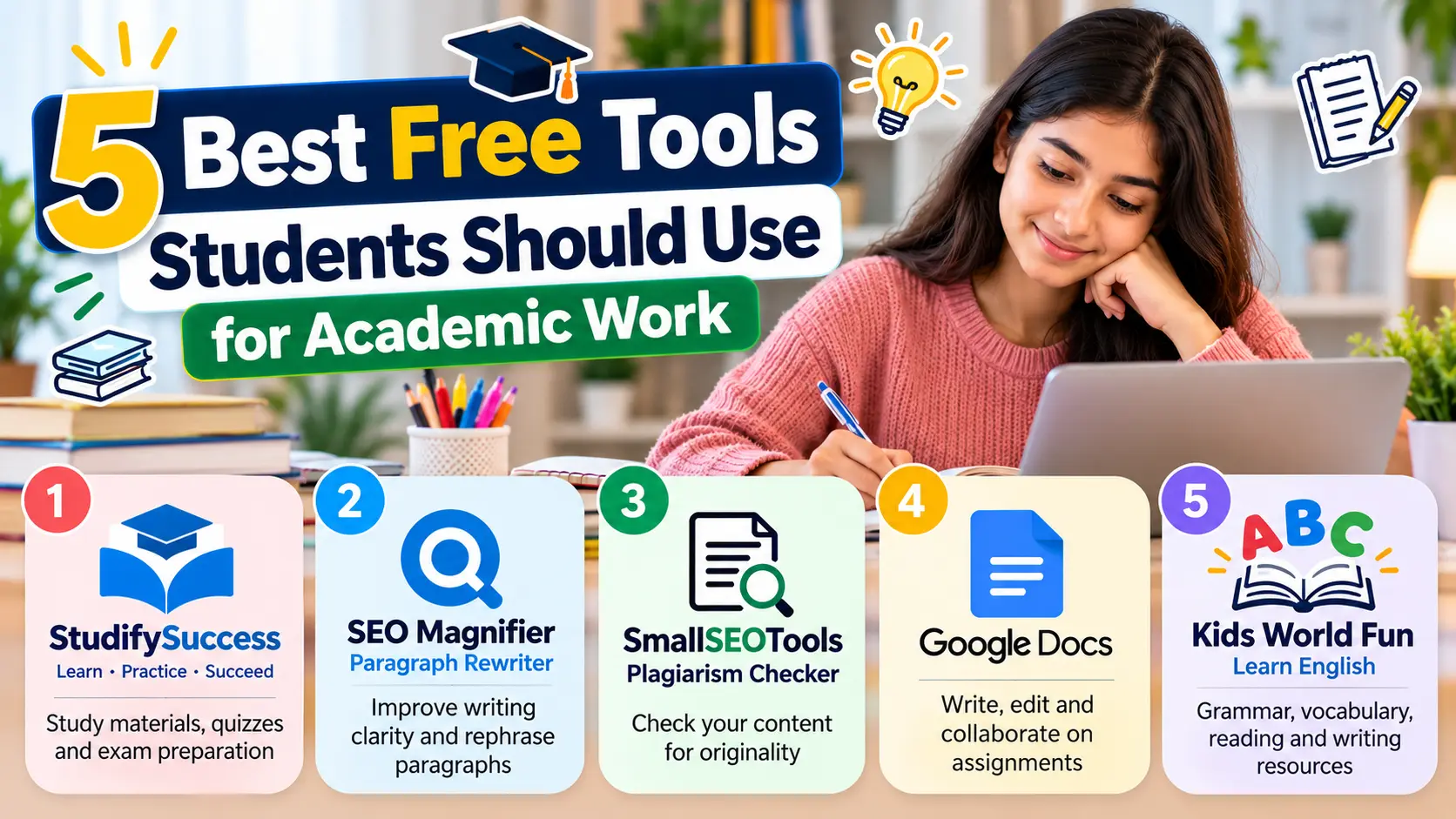
In this article, we'll explore five useful tools students can consider for their academic work, including StudifySuccess, SEO Magnifier Paragraph Rewriter, SmallSEOTools Plagiarism Checker, Google Docs, and Kids World Fun. We'll examine their features, practical benefits, and limitations to help you choose suitable options for your learning needs.
1. StudifySuccess App
Managing multiple subjects, completing homework, and preparing for exams can be challenging, especially when students struggle to find reliable learning resources in one place. The StudifySuccess App is an online educational platform designed to help school students understand academic concepts, organize their studies, and prepare for examinations more effectively.
The platform focuses primarily on students from Classes 6 to 12, offering learning resources aligned with CBSE, ICSE, and State Board curricula in India. Its educational features include study notes, video lessons, practice questions, quizzes, and exam preparation materials.
Whether you're revising difficult chapters, preparing for board examinations, or practicing questions before a class test, StudifySuccess provides resources for different academic needs.
Students can explore the platform by selecting their class and relevant subjects to access available learning materials. The app also describes features such as revision planning, mock tests, progress tracking, and doubt-solving support, which can help students identify areas that require additional attention.
One useful aspect of StudifySuccess is its combination of learning materials and academic support. Its learning platform lists free resources such as study materials, sample papers, question banks, and test series, making it worth exploring for students looking for accessible educational assistance.
However, not every service is completely free. The app includes in-app purchases, while certain personalized learning programs and academic support services require payment. Students should check which features are available without a subscription before choosing a plan.
Overall, StudifySuccess may be particularly useful for Indian school students who want curriculum-focused learning resources and additional support with homework, revision, and exam preparation.
Pros
Provides learning resources for Classes 6 to 12
Supports CBSE, ICSE, and State Board curricula
Offers free study materials and practice resources
Includes quizzes and exam preparation features
Provides options for academic guidance and doubt-solving
Cons
Some courses and advanced support services require payment
2. SEO Magnifier Paragraph Rewriter
Writing clear and well-structured paragraphs can be challenging, especially when students struggle with repetitive wording, complicated sentences, or unclear explanations.
The SEO Magnifier Paragraph Rewriter is a free online AI paragraph rewriting tool that helps students explore alternative ways to express their ideas while aiming to preserve the original meaning.
Whether you're revising an essay, improving assignment drafts, or simplifying difficult paragraphs, this tool provides rewriting suggestions that can make the editing process more manageable.
To get started, simply paste your paragraph into the text box, select your preferred language, and click "Rewrite Paragraph Now." The tool processes the content and generates a rewritten version. Students can review the suggested changes, adjust word choices, and select expressions that better match their intended message.
It supports multiple languages and offers options to download rewritten content in TXT or HTML format. The platform also provides a plagiarism-checking option for reviewing text after rewriting.
Its straightforward interface is particularly helpful for students who want to improve paragraph clarity or experiment with different sentence structures without spending additional time on manual revisions.
However, automated rewriting may occasionally change the intended meaning, introduce awkward expressions, or replace important academic terminology.
Students should carefully review the results, acknowledge original sources, and follow their institution's academic integrity guidelines before submitting assignments.
Pros
Free online AI paragraph rewriting tool
Supports multiple writing languages
Provides alternative wording suggestions
Offers TXT and HTML downloading options
Helpful for improving paragraph clarity
Cons
Rewritten text may require manual corrections
Cannot guarantee plagiarism-free or academically appropriate writing
3. SmallSEOTools Plagiarism Checker
Maintaining originality in academic writing is important, especially when students prepare essays, research papers, and assignments using information from different sources. The SmallSEOTools Plagiarism Checker is a free online plagiarism detection tool that helps students identify text similarities and review their work before submission.
Whether you're checking an essay draft, reviewing a research assignment, or ensuring that borrowed information has been properly acknowledged, this tool makes basic plagiarism checking more accessible.
To get started, simply paste your content into the text box or upload a supported document. Click the plagiarism checking button, and the tool scans the submitted text for similarities with available online sources.
The results help students identify potentially matching content and review sections that may need proper citations, quotation marks, or clearer original explanations.
Its free version supports up to 1,000 words per scan, making it useful for checking shorter assignments or individual sections of longer documents. Students can also upload files in formats such as DOC, DOCX, TXT, and PDF.
However, plagiarism checkers identify textual similarities rather than definitively determining academic misconduct. Properly cited quotations may appear as matches, while some copied material may go undetected. Students should also avoid uploading confidential or unpublished academic work without reviewing the service's privacy policy.
Pros
Free plagiarism checking for shorter text
Supports multiple document formats
Helps identify potentially matching content
Useful for essays and research assignments
Simple copy paste and document upload options
Cons
Free scans are limited to 1,000 words
Cannot guarantee detection of all plagiarism
4. Google Docs
Writing assignments, organizing research notes, and working on group projects can become challenging when students need to manage multiple documents or collaborate with classmates.
Google Docs is a free online document editor that helps students create, edit, and share academic work without requiring expensive word-processing software.
Whether you're preparing essays, writing research papers, taking lecture notes, or completing group assignments, Google Docs provides useful writing and collaboration features in one accessible platform.
To get started, simply sign in with your Google account, open Google Docs, and create a new document. Students can write and format text, insert tables, add images, and organize information using headings and lists.
One of its most useful features is real-time collaboration, which allows multiple students to work on the same document. Group members can add comments, suggest edits, and review changes without repeatedly sending updated files to one another.
Google Docs also saves changes automatically and provides version history, allowing students to review earlier edits or restore previous versions when necessary.
Another helpful feature is its integration with Google Drive, which makes it easier to organize documents and access assignments across different devices.
Offline editing is also available when enabled in advance, making it useful for students who occasionally work without an internet connection.
However, Google Docs requires a Google account, and some advanced formatting or document layout features may be less comprehensive than those offered by dedicated desktop word processors.
Students should also check sharing permissions before uploading or collaborating on confidential academic materials.
Pros
Free document creation and editing
Supports real-time group collaboration
Automatically saves document changes
Includes comments and version history
Accessible across devices with offline editing options
Cons
Some advanced formatting features are limited
Offline access requires advance setup
5. Kids World Fun English Learning Resources
Developing strong English language skills is important for academic success, especially when students need to understand textbooks, write assignments, and communicate their ideas clearly. Kids World Fun is a free online educational platform that provides English learning resources designed to help school students improve their grammar, vocabulary, reading, and writing skills.
Whether you're preparing for an English examination, practicing sentence structure, or improving reading comprehension, the platform offers educational materials for different learning levels.
Students who want to Learn English can explore lessons, stories, quizzes, and worksheets organized by grade level. The platform includes resources ranging from preschool activities to Grade 10 lessons, making it particularly useful for younger learners and school students.
To get started, simply visit the English learning section and select your grade or preferred learning category. Students can explore grammar exercises, vocabulary activities, reading comprehension passages, and writing lessons based on their academic needs.
For example, students who struggle with sentence construction can practice grammar topics such as verb tenses, pronouns, prepositions, and subject-verb agreement. Those looking to improve reading skills can use comprehension exercises and short stories to practice understanding written passages.
The website also provides listening and speaking activities, along with printable worksheets that students can complete independently or use alongside classroom lessons.
Its grade-based organization is particularly helpful for students who want to revise specific English topics without searching through unrelated learning materials.
However, the platform primarily focuses on school-level English education rather than advanced university-level language studies. Students who need personalized feedback, live tutoring, or specialized academic English instruction may require additional learning resources.
Pros
Free English learning lessons and activities
Covers grammar, vocabulary, reading, and writing
Offers grade-specific educational resources
Includes quizzes and printable worksheets
Helpful for independent English language practice
Cons
Primarily designed for school-level learners
Limited personalized feedback and live instruction
Conclusion
Choosing the right educational tools can help students manage assignments, improve writing, and prepare for exams more effectively.
StudifySuccess offers curriculum-focused learning resources, while SEO Magnifier Paragraph Rewriter helps improve writing clarity. SmallSEOTools Plagiarism Checker helps identify text similarities, Google Docs simplifies document creation and collaboration, and Kids World Fun supports English language learning.
Each platform serves a different academic purpose, so students should select resources based on their learning needs and available features.
Remember, online tools work best alongside regular study, critical thinking, proper citation practices, and consistent effort. Used responsibly, these resources can make academic work more organized, manageable, and productive.









 Error